
Codester demo · Scripts & Code → Python
DeskCheck — Desktop Test Harness for Coding Agents
Deterministic desktop test loop for coding agents: YAML steps, a named-app allowlist, pass/fail reports.
The demo test
DeskCheck tests are data, never code — a small YAML file. This is examples/demo-pass.yaml from the package, exactly as shipped. It runs against DeskCheck's mock driver, so the whole loop is proven with no real desktop involved.
# Passing MockDriver demo: launch, act, screenshot, assert.
# Run: deskcheck run examples/demo-pass.yaml --config examples/config.yaml \
#        --driver mock --mock-windows demo-app
version: 1
name: demo-pass
app: demo-app
steps:
  - type: launch
    app: demo-app
  - type: wait
    ms: 10
  - type: click
    x: 100
    y: 200
  - type: type
    text: "hello"
  - type: key
    key: Enter
  - type: screenshot
    name: main
  - type: assert
    kind: window-visible
    window: demo-app
  - type: assert
    kind: screenshot-saved
    screenshot: main
The allowlist config it runs under
# deskcheck allowlist config. Default deny: anything not listed here
# is refused at launch AND at every input step.
apps:
  demo-app:
    command: demo-app
    category: app
  # A browser is ONLY allowed with a fresh throwaway profile:
  #   throwaway-browser:
  #     command: chromium --user-data-dir=/tmp/deskcheck-profile
  #     category: browser
  #     throwaway_profile: true
  # These categories are denied even if listed (see docs/SECURITY.md):
  #   secret-vault: {category: password-manager}
  #   keychain:     {category: credential-store}
  #   settings:     {category: system-settings}
Run 1 — the demo test passes
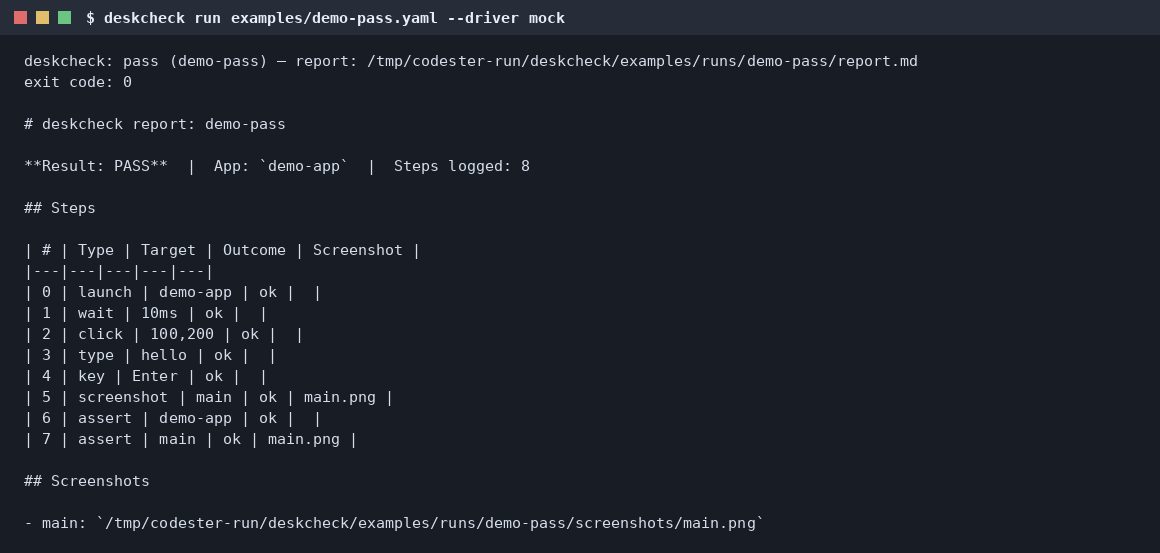
The command, its result, and the report the run wrote (examples/runs/demo-pass/report.md), reproduced from the real run.
$ python3 -m deskcheck run examples/demo-pass.yaml --config examples/config.yaml --driver mock --mock-windows demo-app
deskcheck: pass (demo-pass) — report: examples/runs/demo-pass/report.md
exit code: 0
PASS App: demo-app · Steps logged: 8
| # | Type | Target | Outcome | Screenshot |
|---|---|---|---|---|
| 0 | launch | demo-app | ok | |
| 1 | wait | 10ms | ok | |
| 2 | click | 100,200 | ok | |
| 3 | type | hello | ok | |
| 4 | key | Enter | ok | |
| 5 | screenshot | main | ok | main.png |
| 6 | assert | demo-app | ok | |
| 7 | assert | main | ok | main.png |
The run also writes an HTML report and a JSONL action log next to the Markdown report.
Run 2 — the allowlist says no
DeskCheck's headline feature: only apps you name may be launched or touched. examples/denied-app.yaml asks for an app that is not on the allowlist — here is the actual run.
# Negative test: this app is NOT on the allowlist, so the run must
# fail with a clear permission error (default deny) and log the denial.
version: 1
name: denied-app
app: secret-vault
steps:
  - type: launch
    app: secret-vault
  - type: screenshot
    name: should-never-happen
$ python3 -m deskcheck run examples/denied-app.yaml --config examples/config.yaml --driver mock --mock-windows demo-app
deskcheck: launch denied: app 'secret-vault' is not on the allowlist (default deny — add it to the config to allow it)
deskcheck: fail (denied-app) — report: /tmp/runs/deskcheck/examples/runs/denied-app/report.md
exit code: 1
Whole categories — password managers, credential stores, system settings, browsers carrying real profiles — are refused outright, and the check runs at launch and again at every input step.
From the package
Screenshots shipped inside the Codester package.
What it does
- YAML test steps: launch, wait, click, type, key, screenshot, assert — nothing else exists
- Named-app allowlist with default deny, enforced at launch and at every input step
- Mock driver for hermetic runs — prove the loop works with no real desktop
- Real drivers for Linux (xdotool + scrot) and Windows (PowerShell + .NET)
- Reports in Markdown and HTML, a JSONL action log, and a screenshot per screenshot step
- Pixel-diff assertions: fail when a view changes more than your tolerance
- MCP server included, so an agent can call DeskCheck as a tool
- Exit codes say what happened: 0 pass, 1 fail, 2 setup/parse error, 3 interrupted